

Shaders
In computer graphics, a shader is a computer program that calculates the appropriate levels of light, darkness, and color during the rendering of a 3D scene—a process known as shading. Shaders have evolved to perform a variety of specialized functions in computer graphics special effects and video post-processing, as well as general-purpose computing on graphics processing units.[1]
The following images show examples of effects that can be achieved through shaders. More information about the shaders can be found on the image description pages.
-
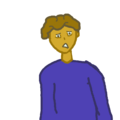 A sprite without any effects applied
 -
 The same sprite, in a VN, turned grayish by a shader
 -
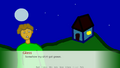 The same character, but with the shirt color changed to green.
 -
 An image based on sprites from the VN The Question
 -
 The art from The question, applying shaders from an asset pack


- Texture: The image or graphic used in a shader. Most often this is the sprite, background, or some other element, but may also refer to secondary or supporting graphics, like grain, dust, etc.
- Mesh: The surface of which a texture is rendered.
- Skinning: The process of associating parts of a texture and mesh to parts of a given model, most often only a process used in 3D visual novels.
- RGBA/RGB: Short for Red, Green, Blue and Alpha, the components of a pixel.
- Vec#: Short for Vector and the number of dimensions a value has.
- Vec2: A value containing 2 dimensions, an X and a Y, expressed as (X,Y), often used as part of coordinate calculations.
- Vec3: A value containing 3 dimensions, an X, Y, and Z, expressed as (X, Y, Z). Vec3 most often is used in 3D coordinate calculations, but may also refer to a color without alpha information, expressed as (R, G, B)
- Vec4: A value containing 4 dimensions, RGBA color, expressed as (R,G,B,A), or XYZS, expressed as (X,Y,Z,S) for coordinates with a scalar.
- Color/Pixel: A unit of a fragment shader's output expressed in RGBA format as a Vec4 value or RGB as a Vec3 value.
- Inputs: Any value provided to the shader, including textures, meshes, and other parameters, used to determine the result of the shader.
- Outputs: The result of the shader. For fragment shaders, this is a color. For vertex shaders, this is a coordinate.
- Uniform values: Uniform values are values that are set and do not change during the execution of a shader's render.
- Varying values: Varying values are values that can be altered by the shader itself and may change during the exection of the shader's render.
- Attribute values: Attribute values are values that are inherit and do not change during the execution of the shader's render.
- Fragments: aka Colors.
- Vertex & Vertices: A vertex is a single point on a mesh/3D model where lines of geometry connect. Vertices is the plural form of vertex.
Shader Types in Visual Novels
- Pixel shaders, also referred to as fragment shaders, are used in 2D and 3D visual novels. These shaders perform calculations on the colors of a given pixel that is part of a texture or rendered mesh.
- Vertex shaders are most commonly used in 3D visual novels, however they can be used in 2D visual novels that use meshes and models to render displays. Vertex shaders modify the position and geometry of a rendered object. In 2D visual novels, these are most often only used to create warping, stretching and skewing effects, though in 3D visual novels they help determine the position and direction of a given vertex, therefore shaping the model and how it responds to light.